
One of the things I really like about Joomla is its menu system. It is much more than a collection of links for visitors to click on. The menu item is the glue that brings everything together: the component, the modules and the configuration that determines how a page is displayed.
It's a clever system, and it works remarkably well. But, as with most things, there are occasions when that cleverness becomes a little inconvenient.
Let me explain.
Imagine you have a Category Blog menu item. Joomla knows that you want to display a blog layout for that category, and you can assign modules to that menu item. Everything works as expected.
A visitor browses the category blog, sees an interesting article and clicks the Read More link.
They are now looking at the full article.
But here's the important bit: that individual article doesn't have its own menu item. Instead, it inherits the menu item context from the Category Blog page that the visitor came from.
And that means it inherits the module assignments too.
Usually that's exactly what you want. The menu item provides the context, and Joomla uses that context to assemble the page.
But what if there is a module that you want on the category blog page but don't want on the individual article pages?
Perhaps you have a module promoting an upcoming event. It's useful when someone is browsing a category of articles, but once they've opened an individual article, you'd rather not have it taking up space.
Joomla doesn't give you a simple way to say: show this module on the category blog, but don't show it on the individual articles reached from that blog.
The usual workaround is to create a separate Single Article menu item for the article. That gives Joomla a new menu item context, which means you can configure a different set of module assignments.
But imagine doing that for hundreds, or even thousands, of articles.
Not exactly practical, is it? And it rather defeats the whole point of having articles inherit their context from the parent menu item.
I've been here before
This isn't actually a new problem for me. More than five years ago I wrote an article about exactly this issue and proposed a solution involving a simple edit to your Joomla template.
You can still read that original article here: Modules Nowhere – the original article
The solution worked. But there was a catch.
Editing a template file is not exactly the most flexible way of managing this sort of thing. It wasn't particularly customisable, it wasn't especially easy to maintain, and it certainly wasn't something I wanted people to have to repeat every time they changed templates or needed different exclusions.
It solved the immediate problem, but it wasn't really the solution I wanted.
So, five years or so later, I've finally done something about it.
Enter Modules Nowhere
Modules Nowhere is a Joomla 6 system plugin that takes the original idea and turns it into something much more flexible and manageable.
Instead of editing your template, you configure everything in the plugin itself.
For each Category Blog or Category List menu item, you can select the individual published modules that you want to exclude from its child article pages. You can also exclude entire module positions, which is particularly useful if you have several modules in a position and don't want any of them appearing on the individual article pages.
You can use either option, or combine the two.
The important thing is that you configure the exclusions once for the parent menu item, rather than having to create individual menu items for every article.
How does it work?
The plugin looks at the menu item ID (Itemid) associated with the article request.
It then checks whether you have configured any exclusion rules for that particular Category Blog or Category List menu item.
If you have, it removes the selected modules and module positions from Joomla's module list before they are rendered.
That's it.
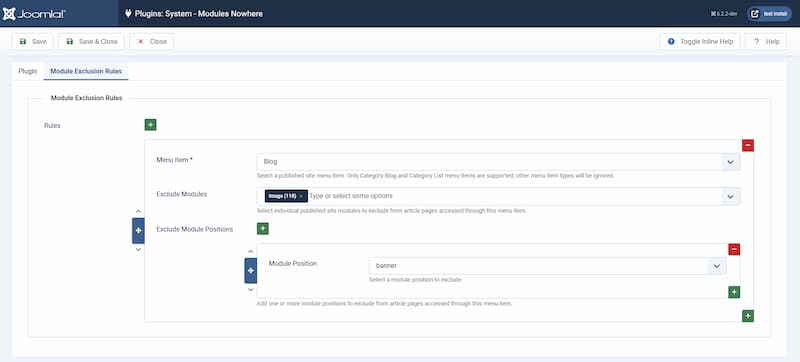
The category blog page itself remains completely unchanged. The exclusions only apply when an individual article is opened using that menu item's context.
And because the rules are configured separately for each menu item, the same article can have different module exclusions depending on which category blog the visitor used to reach it.
No template overrides, no editing PHP files, no CSS tricks and no JavaScript hiding modules after the page has loaded.
Just a system plugin doing what it is supposed to do.
A few things to know
The plugin is deliberately focused on this particular use case.
It works with individual articles accessed through Category Blog and Category List menu items. It doesn't change the category listing pages themselves, and it doesn't apply to articles accessed through Single Article menu items or other unsupported menu item types.
Each menu item has its own independent configuration. Rules aren't inherited from parent menu items, and the plugin doesn't make decisions based on the article's category.
If there isn't a matching rule, Joomla behaves exactly as it always has.
Get Modules Nowhere
You can find the plugin, documentation and installation package on GitHub:
Modules Nowhere – GitHub repository
The plugin also includes its own Joomla update server, so future releases can be discovered through Joomla's normal extension update mechanism.
It's a small plugin that solves a very specific annoyance. But if you've ever maintained a large Joomla site with lots of category blogs and articles, you'll probably understand why I thought it was worth creating.
Sometimes the best solution isn't to create another menu item. Sometimes it's to stop Joomla inheriting something you don't actually want.


 Congratulations, you discovered a hidden secret!