

Showcasing the power of Joomla 4 out of the box with no additional extensions I produced this website (https://brianstest.site). One of the features I created was a masonry style view (https://brianstest.site/trips) with no javascript or css edits - just some simple template overrides.
The tutorial below is for creating that view using custom fields. For a slightly simpler version using tags see the Joomla Tags As Custom Filters.
Setup
-
Create a single category called Trips
- Create a field group with the exact same name as the category.
-
Create the custom fields you need to filter the content eg Departures, Skill, Availability and make sure you place them in the field group you just created.
-
Create multiple articles in the Trips category
- Add values for the custom fields to each article
- Add Readmore to each article
-
Create a menu item of type Articles->Category Blog
-
Set the Blog Layout as follows
- 0 Leading Articles
- 9 Intro Articles
- 3 Columns
- Multi Column Direction - Across
-
Set the Options as follows
- Intro Text - Show
- Category - Hide
- Author - Hide
- Create Date (etc) - Hide
-
Template Override 1
-
Create overrides for Components->com_content->category
-
Open the override for /templates/template_name/html/com_content/category/blog.php
- Insert the code below before line 16
use Joomla\Component\Fields\Administrator\Helper\FieldsHelper; -
Insert the code below before the closing php tag on line 51
$fields = FieldsHelper::getFields('com_content.article'); $filter=""; foreach ($fields as $field) {; if ($this->category->title === $field->group_title) { foreach (($field->fieldparams->get('options')) as $option) { $filter .= ',[value="' . $option->value . '"]:checked ~ .blog-items .blog-item:not([data-category~="' . $option->value . '"])'; } } } /** @var Joomla\CMS\WebAsset\WebAssetManager $wa */ $wa = Factory::getApplication()->getDocument()->getWebAssetManager(); $wa->addInlineStyle(ltrim($filter, ",") . '{display: none; opacity: none;}'); -
On new line 59 insert the following code
<?php $fields = FieldsHelper::getFields('com_content.article'); ?> <?php foreach ($fields as $field) {;?> <?php if ($this->category->title === $field->group_title) {;?> <div class="filter-label d-inline-block"> <?php echo $field->label; ?> </div> <?php foreach (($field->fieldparams->get('options')) as $option) { ;?> <input type="checkbox" class="btn-check" name="CheckBox" id="<?php echo $field->id; ?>-<?php echo $option->value; ?>" value="<?php echo $option->value; ?>"> <label class="btn btn-outline-primary btn-sm" for="<?php echo $field->id; ?>-<?php echo $option->value; ?>"> <?php echo $option->name; ?> </label> <?php }; ?> <?php }; ?> <?php }; ?> -
Save & Close the file.
Template Override 2
-
Open the override for /templates/template_name/html/com_content/category/blog_item.php
-
Insert the code below before the closing php tag on line 35
// for each field get the value $filter = implode(" ", array_map(function($field) {return $field->value;}, $this->item->jcfields)); // remove commas and make lowercase $filter = (strtolower(str_replace(",", "", $filter))); -
Edit the next div so that it looks as belwo
<div class="com-content-category-blog__item blog-item" itemprop="blogPost" itemscope itemtype="https://schema.org/BlogPosting" data-category="<?php echo $filter; ?>"> -
Add the following code at the end of the file
</div>
Optional Template override 3
You may find it useful to have an additional button that will reset all the filters.
- Re-Open the override for /templates/template_name/html/com_content/category/blog.php
- Insert the following code immediately after the second code block you added
$wa->addInlineScript('function unselectCheckboxes() {const checkboxes = document.querySelectorAll(\'input[type="checkbox"]\'); checkboxes.forEach((checkbox) => {checkbox.checked = false; });}'); - Insert the following code immediately before the third code block you added
<input type="checkbox" class="btn-check" name="ResetAll" id="ResetAll" onclick="unselectCheckboxes()" > <label class="btn btn-outline-danger btn-sm" for="ResetAll">Reset</label>
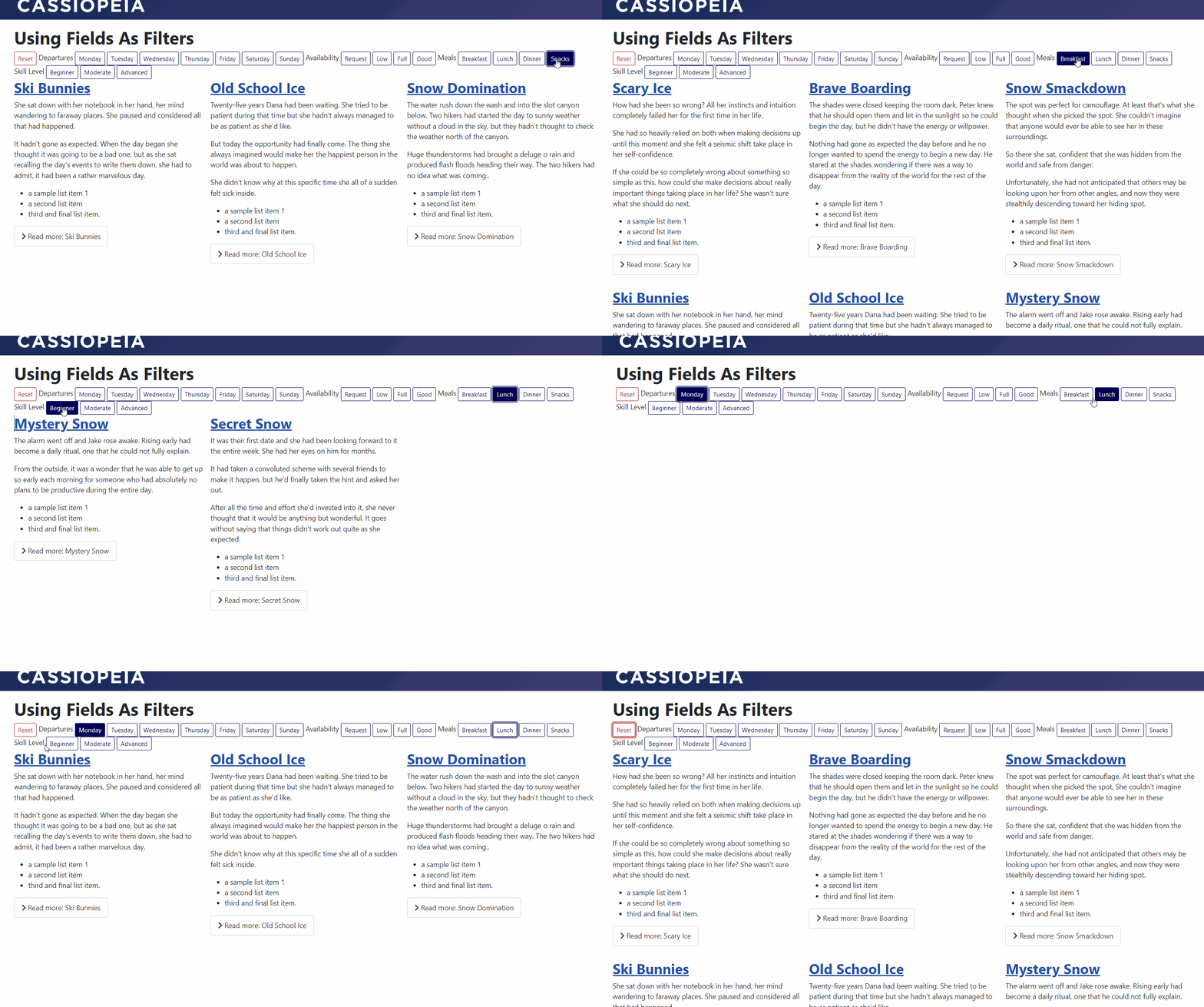
Demo


 Congratulations, you discovered a hidden secret!