
If you use TinyMCE, the default editor in Joomla, you may have noticed a frustrating table issue.
You create a table.
Everything looks fine in the editor.
But when you view the article on the front end… there’s strange white space inside some cells. This only happens in specific circumstances but if it effects you then you need to read this or spend hours pulling your hair out.
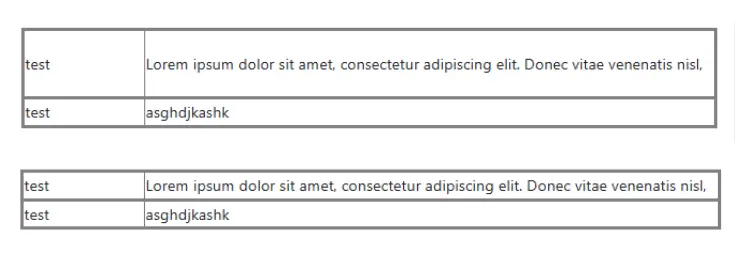
Let’s look at why this happens and how to fix it properly and how to clean up existing articles.
The Problem
When you create a table in TinyMCE inside Joomla! and the text inside a cell wraps onto multiple lines, TinyMCE often adds an explicit height to the <tr>, <td> or <th> element.
<td style="height: 35.5px;">Some wrapped text</td>Why This Causes Issues
The editor window is usually narrower than the actual website layout.
- Text wraps onto more lines
- TinyMCE calculates a height
- It saves that height inline
But on the front end:
- The page is wider
- The text wraps onto fewer lines
- The explicit height remains
The result? Unwanted white space inside the cell.
The same thing can also happen if:
- The front-end font size differs from the editor font size
- The front-end font family renders differently
- Responsive layouts change table width
Because the height is fixed inline, the browser cannot naturally adjust the cell height.
The Solution
The correct long-term solution is:
Allowstyleattributes for formatting, but preventheightfrom being saved on table rows and cells.
You still need style if you want to:
- Set column widths
- Apply background colours
- Adjust text alignment
- Apply other formatting
TinyMCE has a configuration setting that we could use for this invalid_styles but unfortunately this isn't exposed in the Joomla TinyMCE plugin yet so that is not an option.
Joomla 6.1
I am working on a pull request for Joomla 6.1 that will let you set invalid_styles but that isn't ready yet.
Temporary Plugin Solution
I needed a fix for this today so I wrote a TinyMCE plugin (wrapped in a joomla installer) that will remove the height.
- Automatically removes height styles from table cells (<td>), table rows (<tr>), and headers (<th>).
- Removes legacy height="..." HTML attributes.
- Prevents users from resizing table row heights by dragging in the editor.
- Works on new tables, existing tables, and pasted content (including Word tables).
- Fully defensive and safe for production use.
- This ensures clean, consistent table markup and prevents layout issues caused by unwanted inline heights.
You can download it and use it today on Joomla 5 and 6.
Installation of the Plugin
This is a plugin for the TinyMCE that has been packaged to be easy to install with Joomla. It installs like every other Joomla extension but has one additional step to add it to TinyMCE.
TinyMCE Configuration
After installing Remove Heights go to the Joomla Plugin Manager on the System dashboard and open the Editor - TinyMCE plugin.
Once open scroll to the bottom where you will see the option to add External Plugin URLs. Enter the wordremove_heights as the Plugin Name and /media/plg_editors_tinymce/js/plugins/removeheights/plugin.min.js as the Plugin URL.
Don't Forget
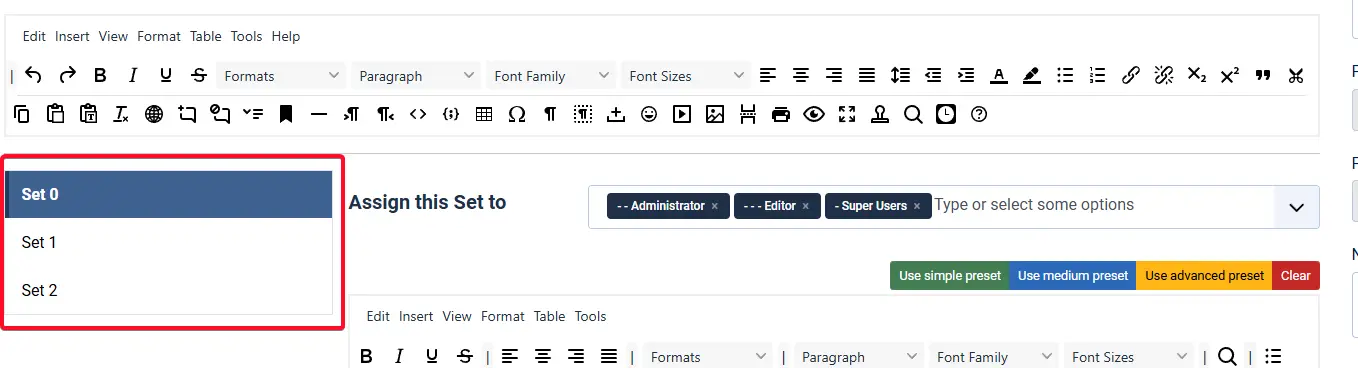
You need to make this change for each Set in TinyMCE
Fixing Existing Articles
Installing this plugin and updating TinyMCE to use it only affects content when it is saved again. If you already have articles with inline height settings, you have two choices.
Option 1 – Open and Save Each Article
The simplest method:
- Open the article.
- Click Save.
- The unwanted height values will be removed automatically when you re-save the article.
This works well for a small number of articles. But if you have many articles, you’ll want a faster solution.
Option 2 – Clean the Database with SQL
Warning
Always make a full database backup before running SQL queries.
You will need to run two SQL queries. Also, do this for both the introtext and fulltext fields in the #__content table (replace #__ with your table prefix).
First Query – Remove the Height Setting
This strips any height: 35px; (or similar) from inline styles on any td, th or tr element.
UPDATE `#__content`
SET
  `introtext` = REGEXP_REPLACE(
    `introtext`,
    '(?i)(<t[drh][^>]*style="[^"]*)height\\s*:\\s*[^;"]+;?',
    '\\1'
  ),
  `fulltext` = REGEXP_REPLACE(
    `fulltext`,
    '(?i)(<t[drh][^>]*style="[^"]*)height\\s*:\\s*[^;"]+;?',
    '\\1'
  );
Second Query – Remove Empty Style Attributes
After removing height, some elements may be left with empty style attributes:<td style=""> This query removes empty style attributes:
UPDATE `#__content`
SET `introtext` = REPLACE(`introtext`, 'style=""', ''),
    `fulltext`  = REPLACE(`fulltext`,  'style=""', '');
This keeps your markup clean and prevents unnecessary inline clutter.


 Congratulations, you discovered a hidden secret!