

Supporting right-to-left (RTL) languages in Joomla — whether Persian (Farsi), Arabic, Hebrew or others — is more involved than simply installing an RTL language pack and flipping a switch. If you’ve ever worked on an international Joomla site, you’ll realize that changing the text direction is the easy part… and the real work is in the details.
In this post I want to share some of the bigger issues you’ll bump into, what isn’t automatic yet in Joomla, and the solutions I’ve been applying to get a truly RTL-friendly site working properly.
Direction Is More Than Text
Yes, setting the language to an RTL locale will switch the text direction. But that’s only the beginning.
A website isn’t just paragraphs of text — it’s navigation, date pickers, arrows, layout rules, and interactive UI elements. Many of these components have directional behaviours baked in that don’t magically reverse themselves just because the page direction changes.
Logical CSS Properties — The Real Fix
Traditionally CSS uses properties like:
leftrightmargin-leftpadding-right
These become problematic in RTL. The proper solution is to use logical properties such as:
inset-inline-startinset-inline-endmargin-inline-startpadding-inline-end
These automatically adapt based on writing direction — so start means “right” in RTL and “left” in LTR. Once you switch to logical properties, you stop fighting the browser and start working with it.
This is not cosmetic. It’s structural.
Tip:
Bookmark this great resource and cheat sheet from Adrian Roselli: CSS Logical Properties and Values. It’s an invaluable reference when updating templates or writing new RTL-friendly CSS.
You Can’t Just Flip Everything
It’s tempting to think RTL support means “swap left and right everywhere.” It doesn’t.
Take time formatting. In RTL languages, time is still written as hour:minute. That doesn’t change. But until very recently the date picker was effectively flipping it visually to minute:hour. This was fixed in Joomla, and you can see the pull request here: GitHub PR #46910.
Not everything should be mirrored.
Dates, numbers, mathematical expressions, code snippets — these follow their own rules regardless of writing direction. Treating RTL as a simple visual mirror causes subtle but serious usability problems.
Arrows, Icons and UI Cues
Some things genuinely do need flipping.
Navigation arrows, pagination icons, breadcrumbs — these are directional indicators. In an RTL interface, “forward” is visually left, not right.
Often this can be solved cleanly with CSS:
html[dir="rtl"] .icon-arrow {
    transform: scaleX(-1);
}
SVGs can also be mirrored. The key point is that arrows communicate meaning, and meaning changes with direction.
The Hidden Nightmare: Writing RTL Content When You’re LTR
Here’s the part nobody talks about.
If you’re a native LTR speaker working in a language you don’t understand — for example Arabic or Hebrew — the editing experience can become extremely confusing.
Everything looks fine in the html markup... But you used the wrong ?
?هل تعتقد أن هذا النظام يعمل بشكل صحيح عندما يتم استخدامه في بيئة متعددة اللغات ومع محتوى طويل قد يلتف على أكثر من سطرIncorrect punctuation (LTR question mark):
?هل تعتقد أن هذا النظام يعمل بشكل صحيح عندما يتم استخدامه في بيئة متعددة اللغات ومع محتوى طويل قد يلتف على أكثر من سطر
Correct punctuation (RTL question mark):
هل تعتقد أن هذا النظام يعمل بشكل صحيح عندما يتم استخدامه في بيئة متعددة اللغات ومع محتوى طويل قد يلتف على أكثر من سطر؟
If you use the wrong punctuation, the browser’s Unicode bidirectional algorithm will try to “fix” what it assumes is broken directionality and move the punctuation. When the line wraps, that question mark can even jump visually into what looks like a random place in the sentence.
You think Joomla is broken. It isn’t. Your punctuation is.
The Temptation: Forcing RTL in langmetadata.xml
Inside every Joomla language pack is a file called langmetadata.xml. In that file is:
<rtl>0</rtl>
0 means LTR. 1 means RTL.
Developers often change this value in their native language pack so they can test RTL while still reading the interface comfortably. The layout flips. The CSS responds. Arrows reverse. It looks convincing.
And it’s useful. But it’s not a full test.
Because you’re still using an LTR language, the browser continues applying LTR text rules. Bidi behaviour, punctuation handling and wrapping quirks will not behave like they do in a true RTL language.
It’s a shortcut. It’s not reality. If you want to properly test RTL, you must use an actual RTL language.
Weird Shit
Even when you do everything “correctly” (set dir="rtl", use a proper RTL language, flip your layout) you can still get problems that can only be described as weird shit happening.
The browser is doing its best to transform your world into a mirrored environment. If you miss one tiny assumption, everything falls apart.
You’ve already seen one example: punctuation jumping because you used the wrong character.
Here’s another example that caused at least one extension developer I know hours of wasted time before they gave up and asked for help.
Timeline Example — LTR vs RTL Fix
Comparison Image:
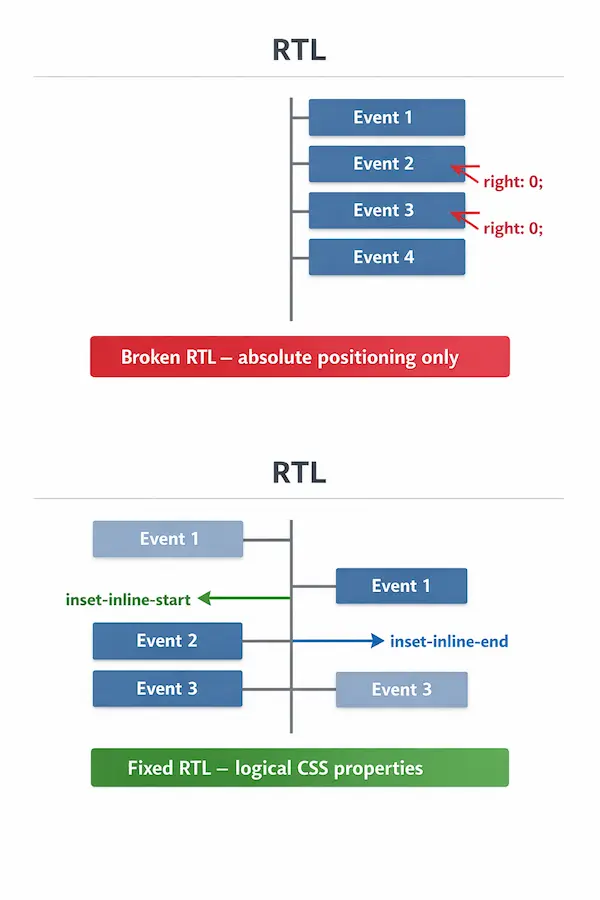
Original LTR Timeline (Broken RTL)
<div class="timeline">
  <div class="event">Event 1</div>
  <div class="event right">Event 2</div>
  <div class="event">Event 3</div>
  <div class="event right">Event 4</div>
</div>
.timeline {
  position: relative;
  width: 400px;
  margin: 0 auto;
}

.event {
  width: 150px;
  padding: 10px;
  background: #ddd;
  margin: 20px 0;
}

.event.right {
  position: absolute;
  right: 0; /* This breaks in RTL */
}
Issue: In RTL, right: 0 moves the .right events to the right — but the default events also shift right because of the mirrored flow. Absolute positioning breaks the layout.
Fixed Timeline with Logical CSS
.timeline {
  position: relative;
  width: 400px;
  margin: 0 auto;
}

.event {
  width: 150px;
  padding: 10px;
  background: #ddd;
  margin: 20px 0;
}

.event:nth-child(odd) {
  inset-inline-start: 0;  /* Left in LTR, Right in RTL */
}

.event:nth-child(even) {
  inset-inline-end: 0;    /* Right in LTR, Left in RTL */
}
<div class="timeline">
  <div class="event">Event 1</div>
  <div class="event">Event 2</div>
  <div class="event">Event 3</div>
  <div class="event">Event 4</div>
</div>
Result: Timeline events alternate correctly in both LTR and RTL without extra hacks.
.timeline::before {
  content: '';
  position: absolute;
  inset-inline-start: 50%;
  width: 4px;
  background: #999;
  top: 0;
  bottom: 0;
  transform: translateX(-50%);
}
Optional: adds a center line that respects RTL automatically.
What Joomla Gets Right — and Where It Stops
To be fair, the core Joomla templates are built properly.
Both the default frontend template Cassiopeia and the administrator template Atum use logical CSS properties. Directional arrows and UI components in core are designed to behave correctly in RTL. If you stick to core functionality, things should display correctly.
However… the same cannot be guaranteed for third-party extensions. If an extension developer hard-coded left and right, used absolute positioning shortcuts, or never tested in RTL, things will break. Not because Joomla failed but because assumptions were made.
RTL support is only as strong as the weakest CSS rule in your stack.
Don’t Keep Quiet
One area where you can really help is the user interface in RTL languages. None of the regular Joomla core contributors are native speakers of RTL languages. We try our best to ensure everything works well, but things get missed.If you spot anything that doesn’t behave correctly in your language, create a GitHub issue with a screenshot. This helps ensure that the interface works for everyone, and your feedback can directly improve Joomla.
Even a small report such as a flipped arrow is incredibly valuable.
Language Packs Are Only the Start
Installing an RTL language pack gives you:
- Localised strings
- Correct
dir="rtl"attributes - Core template support
What it does not give you:
- Logical CSS in every extension
- Automatic correction of punctuation mistakes
- Protection from bidi rendering quirks
- A guarantee that third-party code respects RTL
Supporting RTL properly means reviewing assumptions at every level.
RTL support isn’t a checkbox
It requires:
- Writing CSS with logical properties
- Understanding what should flip — and what absolutely should not
- Testing real content, not dummy Latin placeholders
- Accepting that weird shit will happen
- Checking your extensions, not just core
- Reporting issues when you see them
Joomla delivers excellent RTL support. But it’s not completely automatic, and it’s certainly not "install language pack and walk away."
If you’re building for RTL users, you owe them more than a mirrored layout.
And if you’re an LTR developer working in a language you don’t understand then welcome to the strange and humbling world of bidi debugging.

 Congratulations, you discovered a hidden secret!