

Website performance has never been more important. Faster websites provide a better experience for visitors, rank better in search engines, and often convert more visitors into customers. One of the most important performance metrics measured by Google's Core Web Vitals is Largest Contentful Paint (LCP).
If you've been following performance advice over the last few years, you've probably been told to lazy load your images. In general, that's excellent advice. But there is one image that should almost never be lazy loaded: the hero image at the top of your page.
In this tutorial, we'll look at why the hero image is so important for LCP, why Joomla's default behaviour can work against us, and how to create a simple template override to improve performance.
Understanding Largest Contentful Paint (LCP)
Largest Contentful Paint measures how long it takes for the largest visible piece of content on a page to appear in the browser.
On many Joomla websites, the LCP element is often the Full Article Image, especially when it is used as a hero image at the top of the page.
Google considers an LCP score of:
-
Under 2.5 seconds: Good
-
Between 2.5 and 4 seconds: Needs Improvement
-
Over 4 seconds: Poor
Because the hero image is often the LCP element, anything that delays its download will negatively impact your Core Web Vitals score.
Why Lazy Loading Hurts Hero Images
Lazy loading is designed to postpone downloading images until they are needed.
This is ideal for:
-
Images further down the page
-
Gallery images
-
Related article thumbnails
-
Footer images
However, it is completely the wrong strategy for an image that is immediately visible when the page loads.
When a hero image is marked as lazy loaded, the browser receives instructions that effectively say:
Don't worry about this image yet.
The browser then delays fetching the image until after it has completed other work. The result is that the image appears later than it should, increasing the LCP score.
For the most important image on your page, we want exactly the opposite behaviour. We want the browser to discover the image immediately and start downloading it as quickly as possible.
Joomla's Default Behaviour
Joomla uses layouts to generate many parts of the page output.
When an article contains a Full Article Image, Joomla renders it using the layout:
By default, Joomla automatically adds:
loading="lazy"to the generated image.
For images further down a page this is beneficial, but for a hero image or featured article image that appears immediately when the page loads, it can negatively affect LCP.
A Note About Blog Layouts
By default, Joomla only uses the full_image layout when displaying a full article page. However, if you followed my previous article, Making Joomla Blog Layouts Work Harder: Using Full Images for Leading Articles, you may already be using the Full Article Image as the hero image for the leading article on a category blog page.
In that setup, Joomla uses the same full_image layout when rendering the leading article, which means this override will also apply to your category blog pages. That's particularly useful because the leading article image is often the largest visible element on the page and therefore a strong candidate for the Largest Contentful Paint (LCP) element.
As a result, a single override can improve the loading behaviour of your hero image on both individual article pages and category blog pages.
Fortunately, Joomla makes it easy to override layouts within your template.
Step 1. Creating a Layout Override
Rather than editing Joomla core files, we will create a template override. If your template already has overrides for
layouts/joomla/content, you can skip this step.
From the Joomla administrator:
- Go to System → Site Templates
- Select your active template
- Open Create Overrides
- Expand Layouts → Joomla
- Click Content
Joomla will create the required files in:
/templates/your_template/html/layouts/joomla/content/ 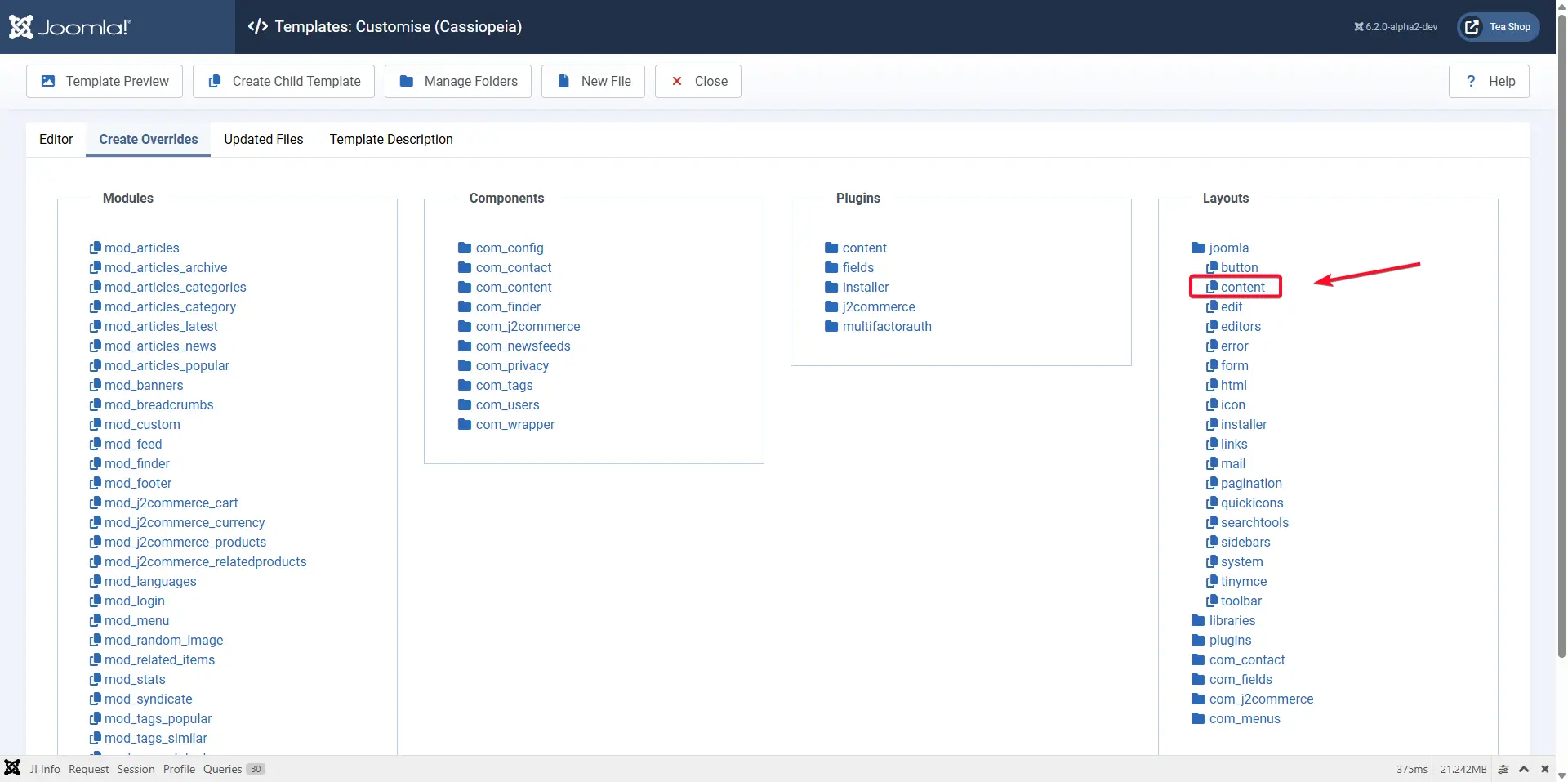
Step 2: Update full_image.php
Navigate the file tree on the left to find and open the file called full_image.php
Find the section that looks similar to:
$layoutAttr = [
    'src'      => $images->image_fulltext,
    'alt'      => empty($images->image_fulltext_alt) && empty($images->image_fulltext_alt_empty) ? false : $images->image_fulltext_alt,
];
Add a new line:
'fetchpriority' => 'high',
This tells modern browsers that this image is an important resource and should be prioritised during page loading.
Add another new line:
'loading' => 'eager',
Your code should now look like:
$layoutAttr = [
    'src'           => $images->image_fulltext,
    'alt'           => empty($images->image_fulltext_alt) && empty($images->image_fulltext_alt_empty)? false : $images->image_fulltext_alt,
    'fetchpriority' => 'high',
    'loading'       => 'eager',
];
Save the file.
Why Use loading="eager"?
Strictly speaking, this isn't required.
The default browser behaviour is already eager loading, so the following would work perfectly well:
'fetchpriority' => 'high',
However, Joomla's layout already applies lazy loading. Adding:
'loading' => 'eager',
is the simplest way to override that behaviour without making more extensive changes to the layout.
Think of it as explicitly telling the browser:
This image is important. Load it immediately.
Testing the Results
After making the change, test your site using tools such as:
-
Google PageSpeed Insights
-
Lighthouse in Chrome DevTools
-
WebPageTest
You should see that the hero image is requested earlier during page load and, in many cases, an improvement in your Largest Contentful Paint score.
The exact improvement will depend on the size of the image, server performance, and the overall structure of the page, but ensuring that the browser prioritises the hero image is one of the simplest and most effective LCP optimisations you can make.
A Final Word
Lazy loading is a fantastic performance feature when used correctly. The mistake many sites make is applying it to every image without considering which image is actually responsible for the user's first impression.
If your article image or hero image is visible as soon as the page loads, it should be treated as a high-priority resource, not deferred until later.
By creating a simple Joomla layout override and changing two attributes, you can help the browser discover, prioritise, and display your most important image sooner, leading to better Core Web Vitals and a faster experience for your visitors.


 Congratulations, you discovered a hidden secret!